Core Web Vitals in 2026: practical guide for developers

Originally published on Bemorex Learn, our learning platform. · Leer en español
What are Core Web Vitals?
Core Web Vitals are a set of metrics defined by Google that measure the real user experience on a web page. In 2026 the three main metrics are:
- LCP (Largest Contentful Paint): visual loading speed
- INP (Interaction to Next Paint): responsiveness
- CLS (Cumulative Layout Shift): visual stability
These metrics are ranking factors in Google and directly affect user conversion and retention.
LCP: Largest Contentful Paint
LCP measures how long it takes to render the largest visible element in the viewport. It's usually a hero image, a video, or a large text block.
Thresholds
| Classification | Time |
|---|---|
| Good | <= 2.5 seconds |
| Needs improvement | <= 4.0 seconds |
| Poor | > 4.0 seconds |
Strategies to optimize LCP
1. Optimize the hero image
<!-- Use a modern format with a fallback -->
<picture>
  <source srcset="/hero.avif" type="image/avif" />
  <source srcset="/hero.webp" type="image/webp" />
  <img src="/hero.jpg" alt="Main banner"
       width="1200" height="600"
       fetchpriority="high"
       loading="eager" />
</picture>
Key points:
- Use
fetchpriority="high"on the LCP image - Never use
loading="lazy"on the LCP image - Prefer AVIF or WebP formats
- Always specify
widthandheight
2. Preload critical resources
<head>
  <!-- Preload the LCP image -->
  <link rel="preload" as="image" href="/hero.webp"
        type="image/webp" fetchpriority="high" />

  <!-- Preload the main font -->
  <link rel="preload" as="font" href="/fonts/inter.woff2"
        type="font/woff2" crossorigin />
</head>
3. Eliminate render-blocking CSS and JS
<!-- Inline critical CSS -->
<style>
  /* Only above-the-fold styles: header, hero, nav */
  :root { --color-bg: #0a0a0f; }
  .hero { min-height: 60vh; display: grid; place-items: center; }
</style>

<!-- Non-critical CSS loaded asynchronously -->
<link rel="stylesheet" href="/styles.css" media="print"
      onload="this.media='all'" />

<!-- Deferred JavaScript -->
<script src="/app.js" defer></script>
4. Server-Side Rendering (SSR)
If you use an SPA framework like Angular, implement SSR so the HTML arrives pre-rendered:
Without SSR: Empty HTML -> Download JS -> Execute JS -> Render -> LCP
With SSR:    Complete HTML -> LCP (while JS downloads in parallel)
INP: Interaction to Next Paint
INP replaced FID (First Input Delay) in March 2024. It measures the total time from when the user interacts (click, tap, keystroke) until the browser paints the next frame.
Thresholds
| Classification | Time |
|---|---|
| Good | <= 200 ms |
| Needs improvement | <= 500 ms |
| Poor | > 500 ms |
Anatomy of an interaction
INP = Input Delay + Processing Time + Presentation Delay

1. Input Delay: time waiting for the main thread to be free
2. Processing Time: time executing event handlers
3. Presentation Delay: time calculating layout, paint, and composite
Strategies to optimize INP
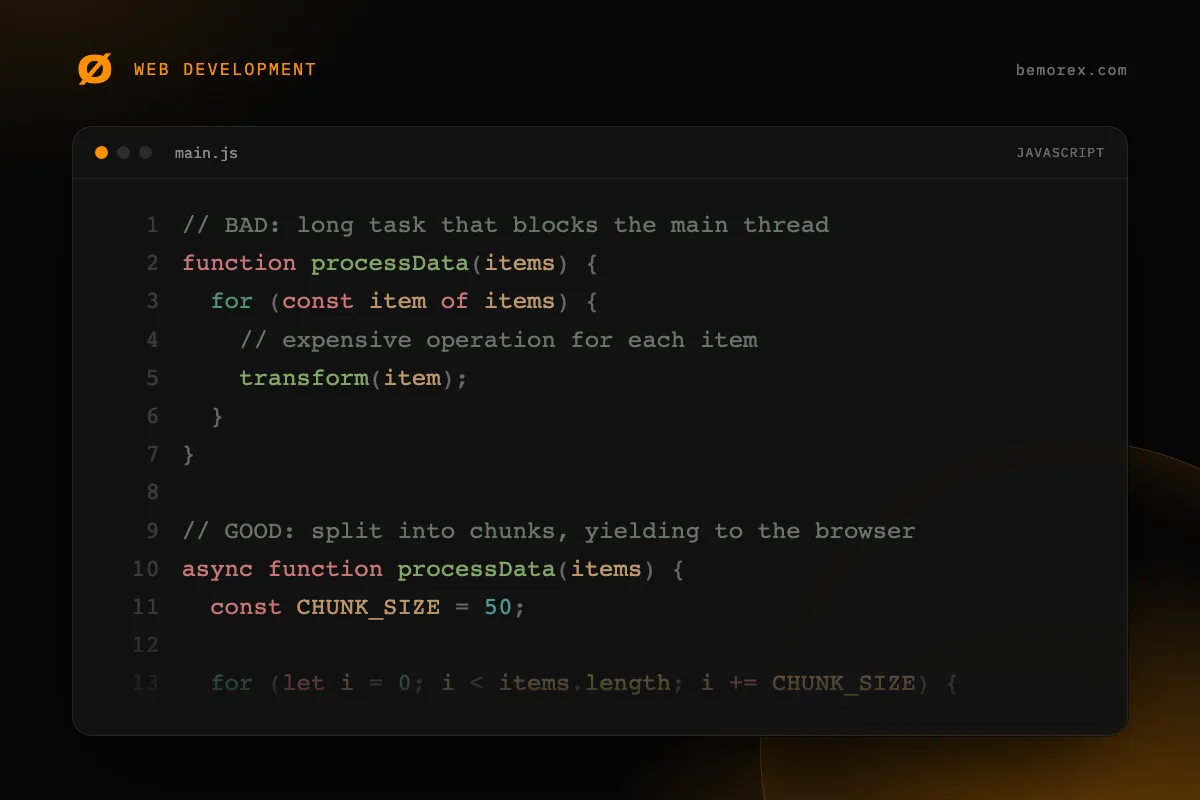
1. Break up long tasks
// BAD: long task that blocks the main thread
function processData(items) {
  for (const item of items) {
    // expensive operation for each item
    transform(item);
  }
}

// GOOD: split into chunks, yielding to the browser
async function processData(items) {
  const CHUNK_SIZE = 50;

  for (let i = 0; i < items.length; i += CHUNK_SIZE) {
    const chunk = items.slice(i, i + CHUNK_SIZE);

    for (const item of chunk) {
      transform(item);
    }

    // Yield control to the browser between chunks
    await scheduler.yield();
  }
}
2. Use requestIdleCallback for non-urgent work
function trackEvent(data) {
  // Do not block user interaction
  requestIdleCallback(() => {
    analytics.send(data);
  });
}
3. Virtualize long lists
Instead of rendering 10,000 elements in the DOM, use virtualization to render only the visible ones. In Angular, you can use @angular/cdk/scrolling:
import { CdkVirtualScrollViewport } from '@angular/cdk/scrolling';

// Only renders the visible items + buffer
CLS: Cumulative Layout Shift
CLS measures the sum of all unexpected layout changes during the page's lifetime.
Thresholds
| Classification | Score |
|---|---|
| Good | <= 0.1 |
| Needs improvement | <= 0.25 |
| Poor | > 0.25 |
Common causes of CLS and solutions
1. Images without dimensions
<!-- BAD: causes layout shift when it loads -->
<img src="photo.jpg" alt="Photo" />

<!-- GOOD: reserves space with width and height -->
<img src="photo.jpg" alt="Photo" width="800" height="450" />

<!-- GOOD: use CSS aspect-ratio -->
<img src="photo.jpg" alt="Photo" style="aspect-ratio: 16/9; width: 100%;" />
2. Web fonts causing FOUT
/* Use font-display: swap with similar sizes */
@font-face {
  font-family: 'Inter';
  src: url('/fonts/inter.woff2') format('woff2');
  font-display: swap;
  /* Adjust metrics to minimize the shift */
  size-adjust: 100%;
  ascent-override: 90%;
  descent-override: 20%;
  line-gap-override: 0%;
}
3. Dynamically injected content
/* Reserve space for banners or ads */
.ad-slot {
  min-height: 250px;
  width: 100%;
  contain: layout;
}
4. Animations that cause layout
/* BAD: top/left trigger layout */
.menu {
  position: absolute;
  top: 0;
  transition: top 0.3s;
}

/* GOOD: transform does not trigger layout */
.menu {
  position: absolute;
  transform: translateY(0);
  transition: transform 0.3s;
}
Measurement tools
Field data (Real User Monitoring)
- Chrome UX Report (CrUX): Real aggregated data from millions of Chrome users
- web-vitals library: JavaScript library to measure in your own users
import { onLCP, onINP, onCLS } from 'web-vitals';

onLCP(metric => sendToAnalytics('LCP', metric));
onINP(metric => sendToAnalytics('INP', metric));
onCLS(metric => sendToAnalytics('CLS', metric));
Lab data
- Lighthouse: Automated audits in Chrome DevTools
- WebPageTest: Detailed testing under different network conditions
- Chrome DevTools Performance panel: Frame-by-frame analysis
Web performance checklist
- [ ] The LCP image uses
fetchpriority="high"and a modern format - [ ] Critical CSS is inlined in the
<head> - [ ] Non-critical JavaScript uses
deferorasync - [ ] All images have
widthandheightdefined - [ ] Web fonts use
font-display: swapwithpreload - [ ] JS tasks longer than 50ms are split into chunks
- [ ] Animations use
transformandopacity, not layout properties - [ ] Third-party resources use
preconnectordns-prefetch
Conclusion
Optimizing Core Web Vitals is not just an SEO concern: it's about building an experience that respects your users' time and attention. With LCP, INP, and CLS as guides, you have concrete, actionable metrics. Measure, optimize, measure again. Performance is a continuous process, not a destination.
Code examples
JavaScript
// Measure LCP with PerformanceObserver
const lcpObserver = new PerformanceObserver((list) => {
  const entries = list.getEntries();
  const lastEntry = entries[entries.length - 1];

  console.log('LCP:', lastEntry.startTime, 'ms');
  console.log('Element:', lastEntry.element);
});

lcpObserver.observe({ type: 'largest-contentful-paint', buffered: true });

// Measure INP
const inpObserver = new PerformanceObserver((list) => {
  for (const entry of list.getEntries()) {
    if (entry.interactionId) {
      console.log('Interaction:', entry.name);
      console.log('Duration:', entry.duration, 'ms');
    }
  }
});

inpObserver.observe({ type: 'event', buffered: true });
HTML
<!-- Preload the LCP image -->
<link rel="preload" as="image" href="/hero.webp"
      fetchpriority="high" />

<!-- Preconnect to third-party origins -->
<link rel="preconnect" href="https://fonts.googleapis.com" />
<link rel="dns-prefetch" href="https://analytics.example.com" />

<!-- Inline critical CSS -->
<style>
  /* Only the above-the-fold styles */
  .hero { min-height: 60vh; }
</style>

<!-- Load non-critical CSS asynchronously -->
<link rel="stylesheet" href="/styles.css" media="print"
      onload="this.media='all'" />