What's new in JavaScript ES2024: everything you need to know

Originally published on Bemorex Learn, our learning platform. · Leer en español
ECMAScript 2024: pragmatic evolution
The ECMAScript 2024 specification (ES15) was officially approved in June 2024 and brings features that many developers had been requesting for years. Unlike previous versions that focused on syntax, ES2024 focuses on practical utilities that simplify day-to-day code.
Object.groupBy() and Map.groupBy()
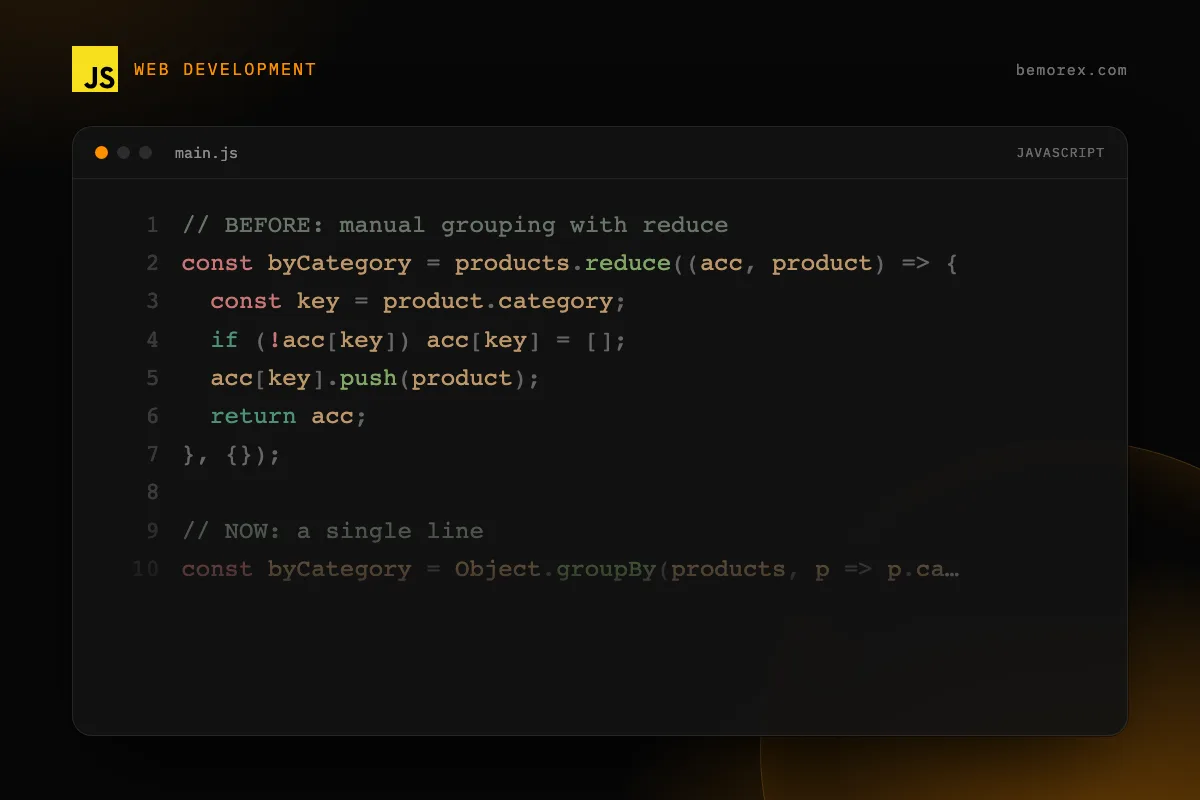
Without a doubt, the star of ES2024. Object.groupBy() lets you group elements of an iterable using a classifier function.
Before vs. Now
// BEFORE: manual grouping with reduce
const byCategory = products.reduce((acc, product) => {
  const key = product.category;
  if (!acc[key]) acc[key] = [];
  acc[key].push(product);
  return acc;
}, {});

// NOW: a single line
const byCategory = Object.groupBy(products, p => p.category);
Map.groupBy() for non-string keys
When you need keys that are not strings (objects, numbers, etc.), use Map.groupBy():
const users = [
  { name: 'Ana', age: 25 },
  { name: 'Carlos', age: 17 },
  { name: 'Diana', age: 30 },
  { name: 'Luis', age: 15 },
];

const byAgeGroup = Map.groupBy(users, u =>
  u.age >= 18 ? 'adult' : 'minor'
);

// Map { 'adult' => [...], 'minor' => [...] }
Important considerations
Object.groupBy()creates an object without a prototype (Object.create(null))- Keys are converted to strings (as in regular objects)
- For complex keys, use
Map.groupBy() - The original iterable is not modified
Promise.withResolvers()
This new static method simplifies a very common pattern: creating a Promise and extracting its resolve and reject functions.
// BEFORE: common but verbose pattern
let resolve, reject;
const promise = new Promise((res, rej) => {
  resolve = res;
  reject = rej;
});

// NOW: clean and direct
const { promise, resolve, reject } = Promise.withResolvers();
Real-world use case: wrapping an EventEmitter
function waitForEvent(emitter, eventName) {
  const { promise, resolve, reject } = Promise.withResolvers();

  emitter.addEventListener(eventName, resolve, { once: true });
  emitter.addEventListener('error', reject, { once: true });

  return promise;
}

// Usage
const result = await waitForEvent(socket, 'message');
Resizable and transferable ArrayBuffer
ES2024 introduces ArrayBuffer with adjustable size and the ability to transfer ownership between contexts.
Resizable ArrayBuffer
// Create a buffer that can grow up to 1MB
const buffer = new ArrayBuffer(256, { maxByteLength: 1024 * 1024 });

console.log(buffer.byteLength); // 256
console.log(buffer.maxByteLength); // 1048576
console.log(buffer.resizable); // true

// Resize
buffer.resize(512);
console.log(buffer.byteLength); // 512
ArrayBuffer transfer
const original = new ArrayBuffer(1024);
const view = new Uint8Array(original);
view[0] = 42;

// Transfer to a new buffer
const transferred = original.transfer();

console.log(original.byteLength); // 0 (detached)
console.log(transferred.byteLength); // 1024
console.log(new Uint8Array(transferred)[0]); // 42
This is especially useful when communicating with Web Workers, eliminating the need to copy data.
String.isWellFormed() and String.toWellFormed()
JavaScript allows strings with incomplete surrogate pairs, which can cause problems when interacting with APIs like encodeURIComponent(). These new methods solve that.
const text = 'Hello \uD800 world'; // lone surrogate

console.log(text.isWellFormed()); // false

const fixedText = text.toWellFormed();
console.log(fixedText.isWellFormed()); // true
// Replaces lone surrogates with U+FFFD (replacement character)
When to use them?
- Before sending strings to external APIs
- When processing data from untrusted sources
- When using
TextEncoderorencodeURIComponent()
Atomics.waitAsync()
An asynchronous version of Atomics.wait() that does not block the main thread:
const sharedBuffer = new SharedArrayBuffer(4);
const sharedArray = new Int32Array(sharedBuffer);

// Does not block the main thread
const result = Atomics.waitAsync(sharedArray, 0, 0);

if (result.async) {
  result.value.then(status => {
    console.log('Worker notified:', status);
  });
}

// In another Worker:
Atomics.store(sharedArray, 0, 1);
Atomics.notify(sharedArray, 0);
RegExp v flag (unicodeSets)
The new v flag extends regular expression capabilities with Unicode character sets:
// Search for emojis (with v flag)
const emojiRegex = /\p{RGI_Emoji}/v;
console.log(emojiRegex.test('hello')); // false

// Set intersection: Greek letters that are uppercase
const regex = /[\p{Script=Greek}&&\p{Lu}]/v;
console.log(regex.test('A')); // false (Latin)

// Set difference: letters except vowels
const consonants = /[\p{Letter}--[aeiouAEIOU]]/v;
Set operations with the v flag
| Operation | Syntax | Description |
|---|---|---|
| Union | [AB] |
A or B |
| Intersection | [A&&B] |
A and B |
| Difference | [A--B] |
A but not B |
Browser support summary
| Feature | Chrome | Firefox | Safari | Node.js |
|---|---|---|---|---|
| Object.groupBy | 117+ | 119+ | 17.4+ | 21+ |
| Promise.withResolvers | 119+ | 121+ | 17.4+ | 22+ |
| ArrayBuffer.transfer | 114+ | 122+ | 17.4+ | 22+ |
| String.isWellFormed | 111+ | 119+ | 16.4+ | 20+ |
| Atomics.waitAsync | 87+ | 128+ | 16.4+ | 16+ |
| RegExp v flag | 112+ | 116+ | 17+ | 20+ |
Conclusion
ES2024 brings improvements that, while not as flashy as arrow functions or async/await, solve real day-to-day development friction. Object.groupBy() and Promise.withResolvers() in particular will change the way we write JavaScript. The best part: they already have broad support across all modern browsers. It is time to adopt them.
Code examples
JavaScript
const products = [
  { name: 'Laptop', category: 'electronics', price: 999 },
  { name: 'Shirt', category: 'clothing', price: 29 },
  { name: 'Phone', category: 'electronics', price: 699 },
  { name: 'Pants', category: 'clothing', price: 49 },
  { name: 'Tablet', category: 'electronics', price: 449 },
];

// Group by category
const byCategory = Object.groupBy(products, p => p.category);

console.log(byCategory);
// {
//   electronics: [{ name: 'Laptop', ... }, ...],
//   clothing: [{ name: 'Shirt', ... }, ...]
// }

// Group by price range
const byPrice = Object.groupBy(products, p => {
  if (p.price < 50) return 'budget';
  if (p.price < 500) return 'mid-range';
  return 'premium';
});